
❓ Frequently Asked Questions
Everything you need to know about using Where's My Poke Friend
📑 Quick Navigation
🏠 General Questions
What is Where's My Poke Friend?
Where's My Poke Friend is a free platform that helps Pokémon GO players connect with other trainers in their local area. You can:
- Post and browse friend codes by city
- Create and find trade offers
- Chat with trainers in real-time
- Generate Pokémon GO search strings using AI
- PokeDealer Service: Get discounted PokéCoins, event passes, and modded GO Plus+ devices
Do I need to create an account?
No! We don't require logins or accounts. Simply:
- Choose your location
- Post your friend code or trade offer
- Receive email notifications when needed
Is the service free?
Yes! Where's My Poke Friend is completely free to use. No subscriptions, no hidden fees.
Note: Our PokeDealer service offers discounted PokéCoins and passes for purchase, but the friend-finding platform itself is always free.
Which locations are available?
We support cities worldwide! Our database includes major cities across all continents. If your city isn't listed, please contact us and we can add it.
👥 Friend Codes & Listings
How do I post my friend code?
Step-by-step:
- Navigate to your city page (or use the "Post Your Code" button)
- Fill in your trainer name and 12-digit friend code
- Select your region (Americas, Europe, Asia/Pacific, Africa)
- Choose if you use Campfire or provide an email
- Select how long your listing should stay active (30, 90, or 180 days)
- Submit!
You'll receive a confirmation email with a deletion link in case you want to remove your listing early.
What is Campfire?
Campfire is Niantic's official social app for Pokémon GO. If you use Campfire, you can select that option instead of providing an email, since Campfire users can communicate through the app.
How long does my listing stay active?
You choose the duration when posting:
- 30 days - Short-term listing
- 90 days - Recommended (default)
- 180 days - Long-term listing
Can I delete my friend code early?
Yes! After posting, you can delete your listing from the same browser (as long as you don't clear your cookies). Look for the delete button next to your listing when browsing your city.
Why can't I see my listing after posting?
Your listing appears immediately! Try:
- Refreshing the page (Ctrl+F5 or Cmd+Shift+R)
- Checking you're on the correct city page
- Looking on page 1 - newest entries appear first
🔄 Trading System
How does the trading system work?
Our trading system connects trainers looking to trade Pokémon:
- Post a Trade Offer: Specify what you're offering and what you're seeking
- Browse Offers: Other trainers see your offer on the trades page
- Commit to Trade: Someone clicks "I Can Trade!" on your offer
- Exchange Contact Info: Both parties receive each other's contact details via email
- Coordinate: Meet up and complete the trade in-game
What happens when someone commits to my trade?
Here's exactly what happens:
- Trade is Marked Complete: Your offer is removed from public listings
- Both Parties Get Emails:
- You receive the committer's email, Discord, and/or Telegram
- They receive your contact information
- Both emails include trade details and Pokémon sprites
- Personal Message Included: The committer can send you a message
- Coordinate Outside Platform: Use Discord, Telegram, or email to arrange meeting details
⚠️ Important: All trading must be completed in the Pokémon GO app. We only facilitate the connection between trainers.
How do I post a trade offer?
Steps:
- Go to your city's trades tab or click "Post New Trade Offer"
- Search and select Pokémon you're offering (up to 3)
- Search and select Pokémon you're seeking (up to 3)
- Add optional descriptions for each side
- Mark special attributes (Shiny, Dynamax, XXL, XXS) if applicable
- Choose duration: 7, 15, or 30 days
- Provide your email and at least ONE messaging platform (Discord or Telegram)
- Submit!
Can I post multiple trade offers?
Yes! You can create as many trade offers as you want. Each offer is independent and can have different Pokémon, durations, and contact information.
Why do I need Discord or Telegram?
Email and at least ONE instant messaging platform are required because:
- Email: For trade notifications and record-keeping
- Discord/Telegram: For quick, real-time coordination of meeting times and locations
What are Special Trades?
In Pokémon GO, Special Trades are trades involving:
- Legendary Pokémon (Mewtwo, Lugia, Ho-Oh, etc.)
- Shiny Pokémon (any shiny variant)
- Mythical Pokémon (Mew, Celebi, Jirachi, etc.) - Note: Most mythical Pokémon cannot be traded at all!
- Ultra Beasts (Nihilego, Buzzwole, Pheromosa, etc.)
- Pokémon not in the recipient's Pokédex (new entries)
- Event costumes or forms (costume Pikachu, Armored Mewtwo, etc.)
- Shadow Pokémon (from Team GO Rocket)
- Purified Pokémon (previously shadow)
Important: Special Trades cost significantly more Stardust (up to 1,000,000 for new legendary entries!) and are limited to ONE per day per player. Best Friends get the biggest Stardust discount.
Can I cancel a trade after committing?
Once you commit to a trade, contact information is immediately exchanged. If you need to cancel, contact the other trainer directly via the provided email/Discord/Telegram and communicate politely.
🔒 Privacy & Security
Is my email address safe?
Yes! We take email security seriously:
- All email addresses are encrypted in our database
- Emails are never displayed publicly
- Only shared with specific traders when you commit or someone commits to your offer
- We use Amazon SES (Simple Email Service) for secure email delivery
- We never sell, rent, or share your email with third parties
📧 Email Notifications: Our transaction emails come from do-not-reply@wheresmypokefriend.com. If you don't see our emails, check your spam folder and add us to your safe senders list.
Who can see my contact information?
Friend Codes: Your trainer name and friend code are publicly visible on your city's page.
Trade Offers: Your email, Discord, and Telegram are ONLY shared with:
- Trainers who commit to your trade offer
- The original poster when you commit to their trade
What data do you collect?
We only collect what's necessary:
- For Friend Codes: Trainer name, friend code, region, optional email
- For Trades: Pokémon details, contact info (email + Discord/Telegram), trade preferences
- For Chat: Username and messages (stored temporarily)
Can I delete my data?
Yes! You can:
- Delete friend codes using the link in your confirmation email
- Request full data deletion by contacting us
Do you use cookies?
We use minimal, essential cookies for:
- Remembering your last visited location
- Session management for chat
- Theme preferences (light/dark mode)
💬 Chat Features
How does the chat system work?
Each city has its own real-time chat room:
- Enter a username (or we'll generate one for you)
- Chat instantly with other trainers in your city
- Receive sound notifications for new messages
- See who's currently online
Note: Chat messages are public to all users in that city's chat room.
Are chat messages saved?
Messages are stored temporarily but may be cleared periodically. Chat is designed for real-time coordination, not long-term storage. For important trade details, use the trading system instead.
What can I use chat for?
Great uses for chat:
- Coordinating raid groups
- Asking about active events in your area
- Finding trade partners
- Sharing tips about local spawn points
- Organizing meetups
🔍 PoGo Search String Generator
What is the PoGo Search String Generator?
It's an AI-powered tool that generates Pokémon GO search strings based on natural language. Instead of memorizing complex filter syntax, just describe what you want!
Example:
You type: "show me shiny legendaries with good IVs"
AI generates:
You type: "show me shiny legendaries with good IVs"
AI generates:
shiny&legendary&3*,4*
How do I use it?
- Visit the "PoGo Search String" page
- Type your request in plain English
- Click "Generate Search String"
- Copy the generated string
- Paste it into Pokémon GO's search box
What AI models are available?
Our search string generator is powered by xAI and Anthropic for the best results.
Can I see all available filters?
Yes! Scroll down on the PoGo Search String page to see the "Complete Manual Search String Guide" with all filters, operators, and examples organized by category.
Why isn't the AI search generator working?
The AI search string generator may occasionally be unavailable due to rate limits or cooldown periods. If you encounter this issue:
- Wait a few moments and try again
- Use the manual search guide below the generator
- Check if your request is clear and specific
⚙️ Technical Issues
I didn't receive a confirmation email. What do I do?
Try these steps:
- Check your spam/junk folder
- Wait a few minutes (emails may be delayed)
- Verify you entered the correct email address
- Add do-not-reply@wheresmypokefriend.com to your contacts
The chat isn't working. How do I fix it?
Common solutions:
- Refresh the page
- Clear your browser cache
- Check your internet connection
- Make sure JavaScript is enabled
- Try a different browser
Which browsers are supported?
We support all modern browsers:
- Google Chrome (recommended)
- Mozilla Firefox
- Microsoft Edge
- Safari (macOS/iOS)
Is the site mobile-friendly?
Yes! Our entire site is optimized for mobile devices. All features work on smartphones and tablets.
How do I report a bug or issue?
Use our Contact Page to report bugs or technical issues. Please include:
- What you were trying to do
- What happened instead
- Your browser and device
- Screenshots (if possible)
Can I suggest a new feature?
Absolutely! We love feedback. Use the Contact Page to share your ideas.
💰 PokeDealer - Coins & Passes
How do PokéCoin top-ups work?
We temporarily sign in to your account on a secure device, load your balance, and log out immediately. Your password is never stored beyond the transaction.
Important: You can change your password after the transaction for added security. We recommend using unique passwords for your Pokémon GO account.
Is there anything special I need to do after you add coins?
Nope! Your coins will be available immediately. You can start using them right away to purchase items, raid passes, or anything else in the Pokémon GO shop.
Instant Delivery: Once we confirm your order is complete, your PokéCoins are ready to use!
Can you send tickets or giftable passes without logging in?
Yes! At Great Friends level (seven days of interactions), we can send giftable passes through the in-game gift system. No account access needed.
- Requires Great Friend status (two hearts, seven days of gift exchanges)
- Works only for items available in the Pokémon GO in-game shop
- Web store exclusive items aren't giftable
What login method should I use?
We recommend using either:
- Pokémon Trainer Club: Set a unique password (15+ characters, mix of symbols/numbers/cases)
- Gmail sign-in: Provide a one-time password (OTP) code during our scheduled window
Security Tip: Consider changing your password immediately after the transaction is complete.
How many coin packs can I buy at once?
We recommend up to 5 packs per session for safety. If you need more, we can do another top-up the following day.
This limit helps protect your account from being flagged for unusual activity.
Which passes can you send?
We can send any pass that's visible in the Pokémon GO in-game shop. However:
- ✅ Giftable raid passes, event tickets, remote raid passes
- ❌ Web store exclusive items (not giftable)
- ✅ Any item with a gift icon in the shop
What payment methods do you accept?
We accept different payment methods depending on your location:
- 💳 PayPal - For remote orders (nationwide)
- 🏦 Zelle - For local meetups (Northern California)
- 💵 Cash - For in-person meetups (Northern California)
Local Meetups: If you're in Northern California, we're happy to meet in person for cash or Zelle transactions!
Payment details will be provided when you text us to place an order.
How long does delivery take?
For PokéCoins: Most orders are processed within 2 hours of payment confirmation.
For Giftable Passes:
- Orders placed between 8:00 AM - 10:00 PM Pacific Time are delivered same day (within 2 hours)
- Orders after 10:00 PM will be delivered the next morning
- Available 7 days a week unless we notify you otherwise via text
For GO Plus+ Device: Ships within 1-2 business days with tracking provided.
Quick Service: We aim to complete all orders as quickly as possible. You'll receive a confirmation text when your order is ready!
Is this service safe?
For PokéCoins & Passes:
We take security seriously:
We take security seriously:
- 🔒 Passwords never stored
- ⚡ Temporary access only (minutes, not hours)
- 🛡️ Safety limits (max 5 packs per session)
- ⏱️ Cooldown recommendations to prevent flagging
- 💬 Transparent communication throughout the process
For GO Plus+ Modded Device:
We've modded over 100 Pokémon GO Plus+ devices with zero reports of bans. This is an official licensed device with unofficial physical modifications. The game recognizes it as a standard GO Plus+ because that's fundamentally what it is—just enhanced.
We've modded over 100 Pokémon GO Plus+ devices with zero reports of bans. This is an official licensed device with unofficial physical modifications. The game recognizes it as a standard GO Plus+ because that's fundamentally what it is—just enhanced.
⚠️ Disclaimer: Use at your own risk. While we've had no ban issues, modifications void the manufacturer's warranty.
🛡️ 30-Day Warranty: All modded GO Plus+ devices include a 30-day warranty covering defects or functionality issues. If your device stops working within 30 days of purchase, we'll replace it free of charge.
How do I place an order?
Simple! Just text us at 916-430-2846.
- Tell us what you want (coins or passes)
- We'll confirm pricing and payment method
- Send payment
- We'll process your order
- You'll receive confirmation when complete
📱 Text only, no calls please! We respond quickly to text messages.
Can I get a refund?
Once coins or passes are delivered to your account, refunds are generally not available. However, if there's an issue with your order, contact us immediately and we'll work with you to resolve it.
Do you offer bulk discounts?
Our pricing already includes significant bulk discounts! The more coins you purchase at once, the better the value. Check our pricing page for current rates.
🎮 Pokémon GO Plus+ Device
What is Pokémon GO Plus+?
Pokémon GO Plus+ is a companion device for the Pokémon GO mobile game (and compatible Pokémon titles). It connects to your smartphone via Bluetooth to let you play without constantly looking at your screen, and it can also track your sleep when used with supported apps.
What can I do with Pokémon GO Plus+?
- Spin PokéStops and Gyms - Automatically collect items
- Throw Poké Balls to catch Pokémon - Auto-catch feature when modded
- Track steps while the app is in the background
- Track sleep and link sleep data to compatible apps
What's included in the box?
- Pokémon GO Plus+ device
- Wrist strap and/or clip
- Charging cable
- Quick start guide and safety information
My device won't pair. What should I do?
Try these troubleshooting steps in order:
- Ensure Bluetooth is turned on and your device is within range
- Make sure Pokémon GO Plus+ isn't already paired with another device
- Restart your phone and the Pokémon GO app
- Hold the button on Pokémon GO Plus+ to reset pairing mode and try again
- Forget/remove the device in your phone's Bluetooth settings and re-pair
- Factory reset: Press and hold the back and top buttons simultaneously for 10 seconds
💡 Pro Tip: If pairing still fails after a factory reset, try charging the device fully and attempt pairing again.
Auto-catching is not working
Confirm your in-game settings match the disabled configuration shown on the left, not the enabled configuration on the right:
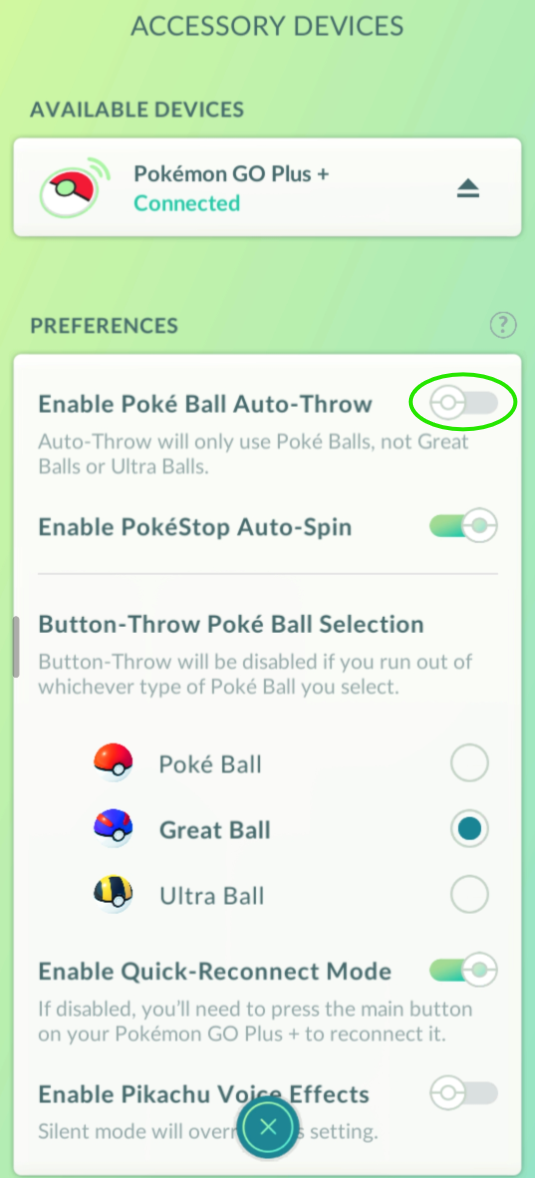
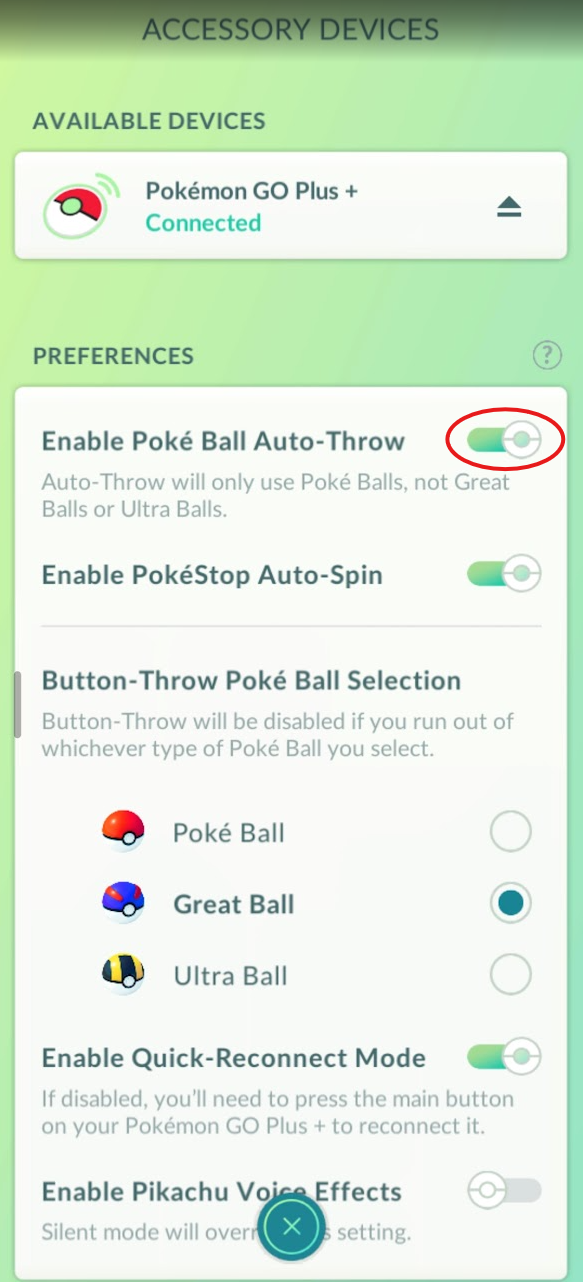
✅ Correct - Disabled
❌ Incorrect - Enabled
Note: Make sure "Nearby Pokémon" is turned ON in your Pokémon GO Plus+ settings—this is required for auto-catching to work. For "Nearby PokéStops" (auto-spin), that setting is up to you. Pokémon detection is always prioritized over PokéStop spinning.
⚠️ If Pokémon aren't being caught:
- Check Pokémon storage space - If your storage is full, the device can't catch anything. Make sure you have available space.
- Check your bag for Poké Balls - Confirm you have the ball type currently selected (Poké Ball, Great Ball, or Ultra Ball). If you've run out of that ball type, the device won't catch Pokémon. Example: If Ultra Balls are selected, confirm you have Ultra Balls in your bag—otherwise the device will blink red indicating it can't attempt a catch.
My device is malfunctioning (blinking lights, main button does nothing when pressed, etc.)
Follow these steps to resolve most issues:
- First step: Make sure the switch is OFF (facing the charging port)
- Try a soft reset by pressing the small button on the back of the device
- If this doesn't work, perform a factory reset by pressing and holding the back and top buttons simultaneously for 10 seconds
Important: Always check the switch position first—many issues are caused by the switch being in the wrong position.
My device keeps going in and out of sleep mode (LED going blue and then red repeatedly)
This is a common issue with a simple fix:
Cause: If the Pokémon GO Plus+ is not currently connected to your Pokémon GO app and the switch is set to the ON position (away from the charging port), it will cycle in and out of sleep mode.
Solutions:
- Option 1: Reconnect the device to your Pokémon GO app
- Option 2: Turn the switch to the OFF position (facing the charging port)
This behavior is normal when the device is powered on but not connected. Simply turn off the switch when not in use to prevent battery drain.
Need more help with your GO Plus+ device?
Check out our PokeDealer page for more information about modded features, or contact us directly if you need personalized assistance.
📱 Text us at 916-430-2846 for quick support with your device!